
Workshop Experience : Semester B Week 5 Portraiture
Week 5 proper in class and we are getting all over portraiture photography !
This week we went through in detail the different genres of portraiture and how the particular genre is to be shot to get the best effect. Portraiture I love but have only really played with street style portraiture - randoms stopped in the street and posed in the street environment at the time. I am looking forward to the studio style portraiture we now need to play with.
Our portfolio will need to cover :
- Environmental, where we capture not only the subject but also the surrounds to help add to the story we are trying to tell. Eye contact is critical for this genre. Check out the work of Arnold Newman to see how a legend does it
- Group, being 3 or more people. Location and capturing how the group relate to each other is key. And is probably the hardest to achieve a good result.
- Straight, being your classic head/shoulders in to the lens type portrait. Background/surrounds less important and its all about the engagement in to the camera of the subject.
We have only just started on the lighting options around portraiture as well, but I will now start using a small off camera softbox flash capability as well as a reflector - will see what the results are like soon enough!
I picked up a pretty easy to read and instructive book on portraiture as well.

©Erik Valind
What I like about this book is you start out with understanding basics and the genres and camera settings and lenses etc, and then within chapters you are getting instruction on 2, 3 4 light source portrait setups either in a studio or outdoors. Really easy to follow, great examples of before light and after light portraits, and great step by step set up instructions and ideas. A great read for beginners and intermediates and especially because it doesn't push for equipment purchase and rather lets you see what can be achieved with a minimal kit list eg. a camera and maybe a off camera flash set up with a reflector. I found it very helpful in reinforcing in detail what we are learning about in class, and the light set up instructions and pictures are worth their weight. I recommend getting a copy if you are keen.
In the meantime, check out these great examples below from some masters !
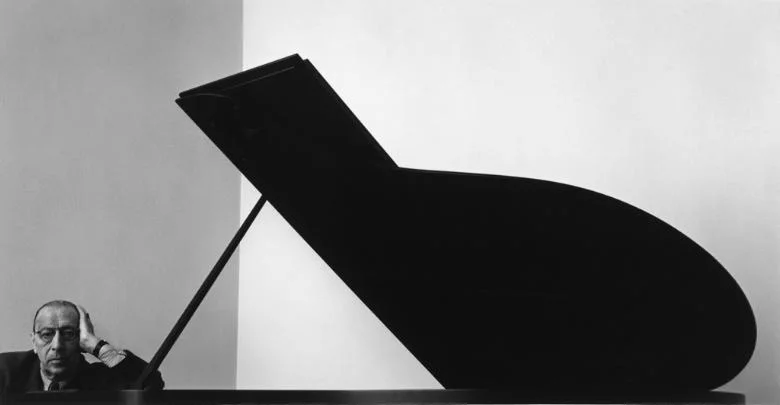
©Arnold Newman

©Dan Winters

Workshop Experience : Semester B Week 5 Digital Lab
Week 5 in the digital lab and our Photoshop understanding is getting more and more detailed and intricate .
I have always found the lab sessions that are part of our course the hardest. I know my way around a computer ok and I can learn software programs like LR and PS enough to be dangerous - and thats the issue I have - I dont know if I want to get good at post processing because its a big black beautiful hole that I could find myself getting lost in forever!
The power of post is amazing in todays age of excellent applications and awesome user interfaces. Couple with the large amount of raw (RAW) data that you can capture from even an entry level DSLR, and bingo - you have the recipe for hours and hours of processing fun and betterment. Maybe.
With even my limited exposure to photography, getting it "right" in camera was one of the early doctrines I try to live by when capturing images. And even if it isn't right, live with it and improve the next time, and the next. So learning my way around Lightroom (LR) perfectly matched this view - LR is powerful enough to do some funky things, but easy enough to do just basic adjustments and then move on.
Now that I am getting more and more exposure to Photoshop CC (PS) I am understanding more the amazing array of adjustment and enhancement capabilities we can now deploy, if we know how and where to apply them.
And that is the balance I suppose - we all see images that have been pushed way too far in post, over worked with the clarity slider or way too much contrast for the image, or dodged and burnt in to pixel heaven - but there is a style in that as well and in the right hands and pen/mouse, works.
I will continue to try and get my head around all the power that is within PS and in particular for landscape and environmental images, will use these skills to hopefully improve the image overall.
Below are some before and afters using just entry level PS capabilities - Tonal Adjustment Layers, Masking, and Dodge and Burn.


Aerial Landscape, DJI P3P, ISO200, f2.8, 1/200, 31metres


Portrait, Leica Q, ISO200, f5.6, 1/125, reflector from underneath subject


Portrait, Leica Q, ISO400, f7.1, 1/125

Gear Review : Tim Isaac's Thumbs Up for the Leica Q

Love a well engineered and highly functional accessory? Check out the Thumbs Up from matchTechnical, its a cracker !
I dont mind declaring my very extensive experience in the art and practice of on line purchasing and the many varied fulfilment processes that follow after hitting the "buy" button on any particular site.
And given my many online transactions over the years, I can still show on a single hand the number of online purchasing processes that have blown me away with their consideration, customer focus and attention to detail - and that these experiences also match the product being sold.
Buying a Thumbs Up from Tim Isaac and the team at matchTechnical is one such experience.
But lets start from the start.
What is a Thumbs Up for Leica Q? Well its basically a highly engineered and designed stabilising accessory for your camera - it allows the right palm of the hand to push backwards towards the user, whilst the thumb on the same hand rests in to a perfectly placed curvature to push back against the hand, thus making the camera extremely stable, able to be used at ease with only one hand if needed or to be held even more securely with two - and with all functions and buttons accessible at all times.
The only aspect of the camera the accessory "takes over" is the hot shoe slot - it needs something to fasten in to and act as a leverage point - and it does this firmly, snugly, and perfectly matched to the camera at hand, in this case the new Leica Q.

Thumbs Up by matchTechnical, model number EP-SQ, in black
More about this little - and pricey (as all premium accessories are) - gem later, but what about the buying process?
Well on this occasion I got in touch with Tim directly via his site when I read that you could pre-order the Thumbs Up for the Q, given its a new release camera. Whilst there was no mention of this capability on the website that I could find, Tim responded promptly overnight (I am in Australia and he is in Seattle, United States) with an enthusiastic yes, that I could pre order, that he would send me a bespoke Paypal request to fulfil and confirm purchase, and that delivery would start from a certain date in the future. Awesome!
After completing all of that almost in real time with him over email, my order was all set. Love it when on line time zones align.
Within a few days of his first suggested date I got the delivery tracking information and my new Thumbs Up for Leica Q was on its way.
Receiving a product from matchTechnical is a little like seeing the end product of those experienced shopping centre people after they wrap your gifts for you at christmas time. The packaging of a Thumbs Up would give an Apple dispatch person some envy I would suggest.


Once the enjoyment of getting the little gem out of its box is over, placing the Thumbs Up on to the Leica Q gives equal satisfaction due to its well engineered features and snug fit in to both the shoe box and the original thumb rest curvature of the Q on the right had side of the camera.
Protective rubber at all touch points of the Thumbs Up to the camera ensure no Leica Q gets harmed in the process if attaching and using.
Then using this accessory simply enhances the feel and usability of the Leica Q in my opinion. It allows for an aggressive thumb and hand action to hold the camera steady when doing low light/slow exposure work, and makes it very comfortable to hold when not shooting and simply walking around at the ready for a shot.

A follow up email back to Tim to let him know the goods had arrived all well and good prompted him to respond with an insight in to his and the teams design philosophy, why the Thumbs Up came about, and his on going passion for the accessory and what he and the team do. It was great to read and know in a small way we were helping each other out in varying ways.
The Thumbs Up from Tim and matchTechnical is an absolute winner accessory which is well worth the outlay. Over time I have purchased one for a Fuji x100s, a Leica M-P and now the Q and all products came with the same considered design, engineering, functionality and customer service.
And it helps with the overall function of your camera. Every time.